
Modern connectivity is no longer a luxury; it is a utility as fundamental as water and electricity. According to recent industry data, the average smart home now contains over 50 connected devices, creating a dense network environment that traditional wiring simply cannot support. If your home’s digital backbone is weak, your daily experience will suffer from dropped calls, buffering streams, and frustrated family members. This guide explains how to integrate robust internet infrastructure directly into your custom home’s floor plan during the design phase. (About Us Vertical Custom)
Why Infrastructure Matters Before Walls Go Up
Most homeowners make the mistake of treating internet connectivity as an afterthought. They wait until the drywall is up to call a technician. By then, it is often too late to run cables through walls without damaging the finish. Vertical Custom Homes emphasizes that the Design+Build process allows us to coordinate these critical details early. When you work with a team that understands both architecture and technology, you avoid costly retrofits later. (Sarasota Custom Home Builder)
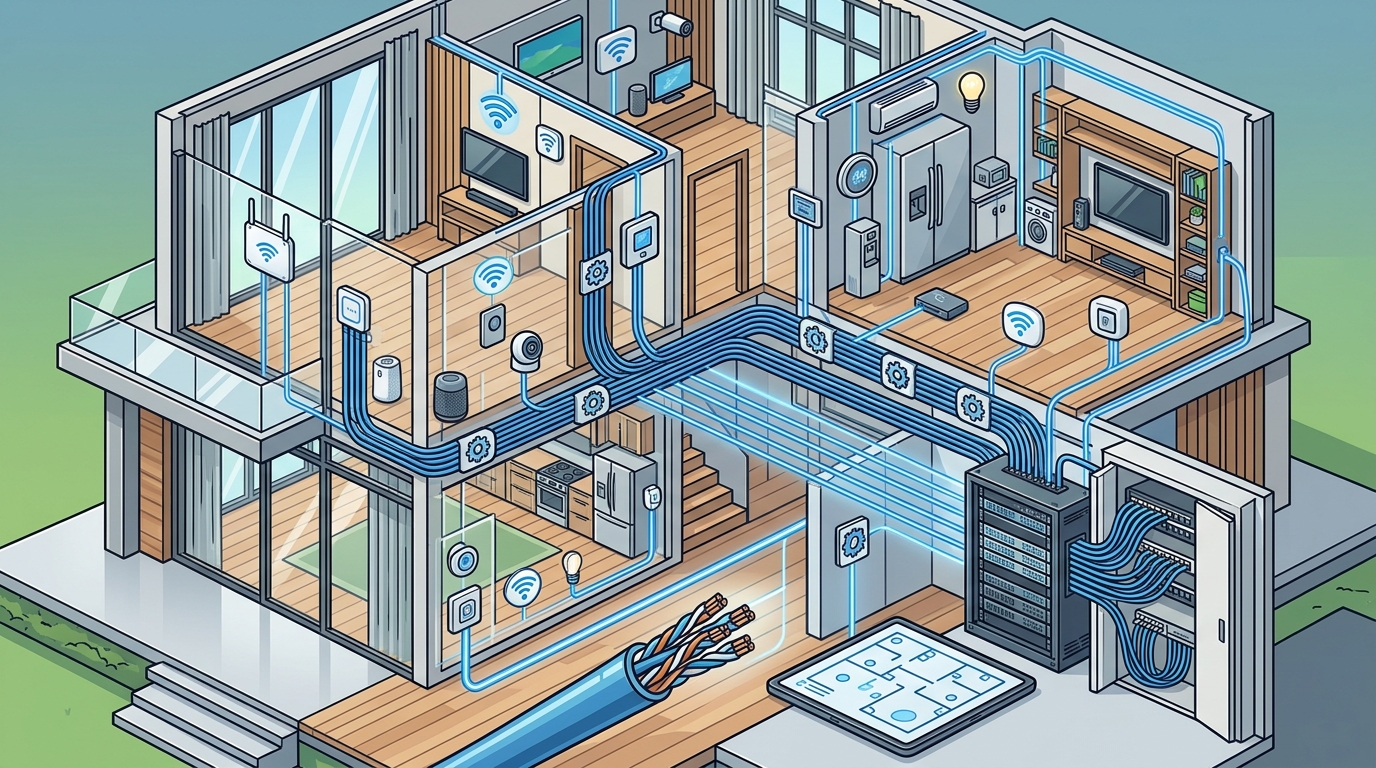
Internet infrastructure in a custom home refers to the physical pathways and devices that allow data to flow. This includes the main entry point, the distribution panels, the cabling, and the wireless access points. A well-planned system ensures that every room, from the master suite to the garage workshop, receives high-speed, low-latency connectivity. This is essential for remote work, 4K streaming, and smart home automation. (Blog Vertical Custom Homes)
Consider the difference between a home built with future-proofing in mind and one that is not. In a future-proofed home, the owner can upgrade their internet service provider without tearing into the walls. In a poorly planned home, upgrading from fiber to a faster tier might require new cabling runs. This distinction is why early planning is non-negotiable for luxury custom homes.
Design Phase Planning and Layout
The first step in selecting the right internet floor plan is determining your household’s digital needs. Do you work from home? Do you have multiple gamers? Do you host large gatherings? Your usage patterns dictate the density and placement of your network nodes. At Vertical Custom Homes, we collaborate with your team to map these needs against the architectural layout.
Identifying the Central Hub
Every home needs a central location for its network equipment. This is often called the telecommunications room or the smart home closet. It should be a secure, ventilated, and accessible space. Ideally, this room is located near the main entry point of the internet service. This minimizes the length of the incoming cable and reduces signal loss. We typically recommend placing this closet in a garage, a utility room, or a dedicated closet near the main living areas.
Strategic Access Point Placement
Wireless access points (WAPs) are the devices that broadcast your Wi-Fi signal. To ensure even coverage, you must place these strategically. A common mistake is placing all WAPs in the central hub. This leaves dead zones in the corners of the house. Instead, we plan for a distributed system. WAPs are placed in ceilings or high on walls in key living areas, such as the great room, kitchen, and bedrooms. This creates a seamless mesh network that allows you to move from room to room without dropping your connection.
Considering Structural Obstacles
Custom homes often feature large open spaces, high ceilings, and unique architectural elements. These features can interfere with Wi-Fi signals. Thick stone walls, metal roofing, and large glass windows can block or reflect signals. During the design phase, we account for these obstacles by adjusting the placement of access points and selecting hardware with higher gain antennas. This ensures that your signal penetrates every corner of your home.
Hardware Selection and Placement
Choosing the right hardware is as important as the layout. The market offers a wide range of options, from consumer-grade routers to enterprise-grade systems. For a custom home, we recommend enterprise-grade hardware. These devices are built to handle more connections, generate less heat, and offer better security features.
One critical component is the network switch. This device connects all your wired devices to the network. It should be located in the central hub and have enough ports to accommodate all your needs. We typically recommend a managed switch, which allows you to prioritize traffic. For example, you can prioritize video conferencing traffic over file downloads to ensure smooth performance.
Another important component is the network interface card (NIC) in your devices. While you cannot control the NICs in your laptops and phones, you can control the NICs in your desktop computers and smart home hubs. We recommend installing Cat6a or Cat7 Ethernet ports in key locations. This ensures that your wired devices can handle the full speed of your internet connection.
Wiring Standards and Materials
The physical cables that carry your data are the veins of your home’s digital system. The type of cable you choose determines the maximum speed and bandwidth your home can support. For new construction, we strongly recommend Cat6a or Cat7 cabling. These cables support speeds up to 10 Gbps and are backward compatible with older standards.
It is also important to consider the pathway for your cables. This includes the conduits that run from the street to your home and the chases that run through the walls. We recommend installing empty conduits alongside your electrical lines. This allows you to pull new cables in the future without opening up the walls. This is a small investment that provides significant long-term flexibility.
Finally, do not forget about grounding and surge protection. Florida’s lightning-prone climate requires robust protection for your electronic equipment. We install surge protectors at the main entry point and at each distribution panel. This protects your network equipment from power surges and lightning strikes.
Service Provider Comparison
Once your internal infrastructure is in place, you must choose an internet service provider (ISP). The availability and quality of ISPs vary by location. In the Sarasota and Southwest Florida region, homeowners typically have access to several high-speed options. The table below compares the common types of connections available.
| Connection Type | Max Speed | Reliability | Best For |
|---|---|---|---|
| Fiber Optic | Up to 10 Gbps | Very High | Heavy usage, remote work, 4K streaming |
| Cable (Coax) | Up to 1 Gbps | High | General household use, gaming |
| Fixed Wireless | Up to 100 Mbps | Moderate | Rural areas, backup connection |
| Satellite | Up to 200 Mbps | Low to Moderate | Remote locations, emergency backup |
Fiber optic is generally the best choice for custom homes. It offers symmetrical upload and download speeds, which is crucial for video conferencing and cloud backups. If fiber is not available in your area, cable is a strong alternative. We recommend avoiding satellite connections as your primary source due to latency issues that can affect real-time applications.
Key Takeaways
- Plan Early: Integrate internet infrastructure during the design phase to avoid costly retrofits.
- Central Hub: Locate your telecommunications room near the main entry point for optimal cable management.
- Distributed WAPs: Place wireless access points throughout the home to eliminate dead zones.
- Future-Proof Wiring: Use Cat6a or Cat7 cabling and install empty conduits for future upgrades.
- Enterprise Hardware: Choose managed switches and enterprise-grade routers for stability and security.
- Surge Protection: Install surge protectors to safeguard against Florida’s frequent lightning storms.
- Fiber First: Prioritize fiber optic connections for symmetrical high-speed performance.
Frequently Asked Questions
What is the difference between Cat6 and Cat6a cable?
Cat6a is an enhanced version of Cat6 that supports higher bandwidth and reduces crosstalk. It is better suited for gigabit and 10-gigabit networks, making it ideal for new custom homes.
How many wireless access points do I need?
The number of access points depends on the size and layout of your home. As a general rule, you need one access point for every 1,500 to 2,000 square feet. Larger homes or those with thick walls may require more.
Can I add more access points later?
Yes, if you install the correct wiring and conduits during construction, you can easily add more access points later. This is why planning for future expansion is critical.
What is a telecommunications room?
A telecommunications room is a dedicated space in your home where your network equipment, such as routers, switches, and servers, is housed. It should be secure, ventilated, and accessible.
Why is grounding important for home networks?
Grounding protects your electronic equipment from power surges and lightning strikes. In Florida, where lightning is common, proper grounding is essential to prevent damage to your network hardware.
What is the best internet service for a custom home?
Fiber optic is generally the best choice due to its high speeds and symmetrical upload and download capabilities. However, availability varies by location, so you should check with local providers.
How does the Design+Build process help with internet planning?
The Design+Build process allows our team to coordinate with your architect and technology consultant early in the design phase. This ensures that your internet infrastructure is seamlessly integrated into the home’s architecture.
Start Your Custom Home Journey
Building a custom home is a significant investment. Ensuring that your home’s digital infrastructure is robust and future-proof is a critical part of that investment. Vertical Custom Homes specializes in concept-to-creation services that include detailed planning for every aspect of your home, including its internet connectivity. We invite you to contact us today to discuss your project. Let us help you build a home that is not only beautiful but also brilliantly connected.